
Expo Go
Expo ProjectLibraries & Demo
4.3498.00 Reviews
- Version
- 58.0.5
- Installs
- 5.00M
- Age Rating
- Everyone
Screenshots
Our Review of Expo Go
 Analysis by Appyee
When I want to check how a React Native idea feels on a real phone, I find Expo Go useful for getting from a running project to a live preview without building a separate test app first. It is a developer-focused tool rather than an app for everyday phone users, and that distinction matters: its value is in shortening the path between a code change and seeing it on a device.
A quick preview, not a complete testing setup
I think of Expo Go as a convenient window onto work in progress. It helps me inspect layouts, tap through a flow, and catch problems that are easy to miss while looking only at a desktop screen. That makes it particularly handy for developers learning React Native, people building prototypes, and teams that want to discuss a working screen rather than a static mock-up.
Its role is narrower than a full development environment. You still need a project and a way to run it; the app on your phone is the place to open and interact with that project. If you are looking for a finished app builder that handles the whole process without coding, this is not the right fit. Expo Go is most useful when JavaScript and React are already part of your workflow.
Who benefits from having it on a phone?
A beginner can use a real device to judge whether a button is comfortable to tap or whether a screen feels cramped. A more experienced developer may use the same quick preview to check a small visual adjustment before moving on. A product designer or client can also look at a working prototype and give feedback based on an actual interaction, instead of trying to imagine how a design will behave.
For a realistic example, imagine making a form more readable during a short work session. I can change the spacing on my computer, open the running project on a phone, and decide whether the fields are easier to scan. That kind of quick check is more useful than endlessly debating a screenshot, though it should not be mistaken for a thorough test across devices and conditions.
Where it fits among development tools
The usual alternatives solve different parts of the same problem. An emulator is useful when I need to work from a computer or inspect a simulated device, while a physical-device workflow can reveal details that a simulator may not represent in the same way. Expo Go offers a particularly approachable route for trying a compatible project on a phone, but it does not replace either option in every situation.
That trade-off is worth keeping in mind before a project grows. A quick preview can help answer “does this screen feel right?” It cannot, on its own, answer every question about a release build, device coverage, or behavior that depends on a project’s native setup. I would use it early and often, then switch to more complete testing when the work calls for it.
What is Expo Go?
Alright, picture this: you’re deep in development mode, tweaking your app's design, and you want to see your changes immediately. That's where Expo Go comes in. It's this nifty app that allows you to instantly preview your app development work without the need for a full-blown emulator or a physical device for every single test. It’s like having a window straight into your app’s soul.
Installation and Setup
Setting up Expo Go is a breeze. You just grab it from the Google Play Store or Apple’s App Store, and you’re ready to roll. No complicated setup or additional installations needed. The app is pretty lightweight, so it won't hog your phone's resources.
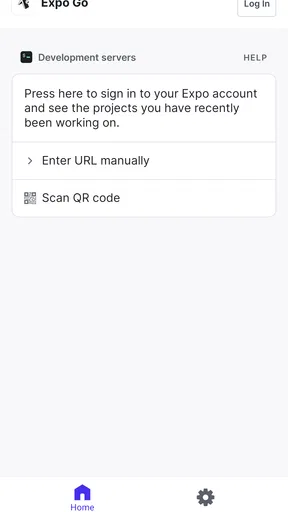
Once you have it installed, you simply scan a QR code generated by your Expo project, and boom, your app is live on your phone. The whole process is so smooth that you’ll wonder how you ever managed without it.
User Experience
The user interface of Expo Go is incredibly intuitive. It’s straightforward, with no unnecessary frills. Just open the app, scan your QR code, and you’re good to go. The responsiveness is top-notch, and it supports hot reloading, which means you can see your changes in real-time. I love how seamless it feels—like the app is an extension of my development environment.
There is a useful distinction between the quick feedback loop and a complete test pass. Seeing a screen refresh after a code change makes iteration feel immediate, but I still treat that as a way to inspect a particular change, not as proof that every flow works. I find it more productive to make one focused adjustment, check it on the phone, and then move on than to change several unrelated things before looking again.
Features That Stand Out
One of the coolest things about Expo Go is its cross-platform support. Whether you're on Android or iOS, the app works like a charm. It supports a wide range of React Native components, which is perfect for testing various functionalities without any hiccups.
For a team, a QR code can make a review session much more concrete: someone can open the current project, try a flow, and describe what feels confusing while the developer is still working on it. I would keep that session focused, though. A shared preview is best for quick feedback on a screen or interaction; it is not a substitute for agreeing on which project version people are reviewing or for checking the finished app independently.
A practical habit is to keep a short list of questions for each preview: is the main action obvious, can I reach the next step, and does the layout still make sense on a phone? Those checks help turn a fast demo into useful feedback instead of a casual tour. If I am reviewing a form, for example, I look at the order of fields and the ease of moving through them, not just whether the colors look right.
Some Things to Consider
While Expo Go is fantastic, it’s worth noting that it’s primarily designed for development purposes. If you're looking to test production-ready apps with native code, you might need to look elsewhere. However, for rapid prototyping and development, it’s hard to beat.
This is also where I would set expectations with a client or teammate. A project that opens in a preview can demonstrate direction and interaction, but it should not be presented as a finished release or as evidence that every device-specific detail has been checked. When a project depends on native code beyond what the preview environment supports, a different build and testing route is the sensible next step.
The network requirement can affect the rhythm of a session, too. If the connection is unreliable, loading or refreshing a project may interrupt the very quick feedback loop that makes the app appealing. I would check connectivity before a live demonstration and avoid planning a critical review around a location where the connection is unpredictable. For solo work, that is merely annoying; in front of a client, it can derail the conversation.
Its place in the wider Expo workflow
Expo Go is a free app from Expo Project, and its broader context is a platform for building apps with JavaScript and React. That makes it an accessible entry point for people exploring that approach, but the phone app itself is only one part of the work. I would choose it when quick device previews are the immediate need, not because installing it alone will create or finish a project.
The app has been available since December 2015, and its current version is 54.0.6. Those details suggest a product with a long-running role in the Expo workflow, while the version number by itself does not tell me exactly what changed between releases. For existing users, the practical question is whether their current project opens and behaves as expected after they update. I would check that with a small, familiar test flow before relying on a newer setup for a presentation or deadline.
That cautious approach is useful for teams as well as solo developers. Keep a known working project available, try the new setup on a low-risk change, and confirm that the features you need are still represented in the preview. This is not a reason to avoid updating; it is simply a sensible way to separate a version label from evidence that a particular project has been checked.
What its popularity does—and does not—tell me
With an average rating of 4.8 from around 23,000 ratings and over one million installs, Expo Go has clearly found an audience among people who need this kind of development preview. It is rated for Everyone and costs nothing to install, which lowers the barrier to trying it. I would still judge it by whether it fits my project: a strong rating cannot remove the need to verify compatibility with the work I am doing.
It also sits in the Libraries & Demo area of app stores, which is a useful clue for prospective users. This is a practical companion for experimenting and demonstrating, not a consumer app with a finished catalog of features to browse. If you enjoy building with React and want to see a project on a phone quickly, that focus is a strength. If you only want to use apps rather than develop them, there is little reason to install it.
Questions I would settle before relying on it
Can I use it without coding? Not in the way a no-code builder works: I would come to it with a React Native project and a development workflow already in mind. Do I need a physical phone? Not for every check, since an emulator can cover some work, but a real device is valuable when I want to feel the interface directly. Does a successful preview mean the project is production-ready? No; it is a useful checkpoint, not a complete release test.
What if the project needs native code or a behavior that the preview cannot provide? I would move to a development build or another suitable testing path rather than forcing the project into a tool with a narrower purpose. And if the network is poor, I would postpone a live demonstration or use a more dependable local testing arrangement. Those choices are not failures of Expo Go; they are part of using a focused preview tool responsibly.
Looking ahead, I would watch how the app’s current releases fit with the projects and workflows I actually use, rather than assume that a newer version automatically changes what the preview can do. The most meaningful signs for me are practical: whether my project opens reliably, whether iteration stays convenient, and whether I know when to hand off testing to a more complete setup. That is the balance that keeps a quick tool useful instead of asking it to do everything.
All in all, Expo Go is a must-have in your development toolkit if you're working with React Native. It makes the whole process incredibly efficient and fun. So why not give it a spin and see how it transforms your workflow?
Privacy and Permissions
See what permissions an app requests and how it handles your data.
- Calendar
- read calendar events plus confidential information, add or modify calendar events and send email to guests without owners' knowledge
- Contacts
- read your contacts, modify your contacts
- Location
- approximate location (network-based), precise location (GPS and network-based)
- Phone
- read phone status and identity
- Photos/Media/Files
- read the contents of your USB storage, modify or delete the contents of your USB storage
- Storage
- read the contents of your USB storage, modify or delete the contents of your USB storage
- Camera
- take pictures and videos
- Microphone
- record audio
- Wi-Fi connection information
- view Wi-Fi connections
- Device ID & call information
- read phone status and identity
- Other
- view network connections, full network access, change your audio settings, control Near Field Communication, run at startup, draw over other apps, control vibration, prevent device from sleeping, modify system settings, install shortcuts
Verdict
Strengths of Expo Go
- Intuitive interface for easy navigation.
- Supports live reloading for quick testing.
- Compatible with both iOS and Android.
- Offers extensive community support.
- Simplifies app development process.
Limitations of Expo Go
- Limited customization options available.
- Requires internet for optimal use.
- May not support all native features.
- Learning curve for beginners.
- Occasional performance lags.
Similar Picks in This Category
View All
PGT: GFX, Launcher & Optimizer
Trilokia Inc.4.5

AusweisApp Bund
Governikus Service GmbH3.7

Cardboard
Google LLC3.2

Gamers GLTool with Game Tuner
Trilokia Inc.4.5

Multi Web Chat - Read Secretly
World Scan & Cleaner3.8

App Cloner Premium & Add-ons
App Listo1.9
Frequently Asked Questions
What is Expo Go and how does it work?
Expo Go is a tool for developers to preview and test React Native projects on their mobile devices. By scanning a QR code generated by the Expo CLI, users can instantly see the changes they make in their code reflected on their device. It simplifies the development process for React Native apps.
Is Expo Go free to use?
Yes, Expo Go is free to use. It provides a convenient way for developers to test and preview their projects without any cost. This accessibility makes it a popular choice for both beginners and experienced developers looking to streamline their app development process.
Can I use Expo Go for both Android and iOS devices?
Absolutely! Expo Go is available for both Android and iOS devices. This cross-platform compatibility ensures that developers can test their applications on a wide range of devices, helping them to identify and fix platform-specific issues efficiently.
Do I need an internet connection to use Expo Go?
Yes, an internet connection is required to use Expo Go effectively. The app needs to connect to the Expo server to fetch your project files. However, once the project is loaded, you can test its functionalities offline, as long as no additional resources are needed.
Are there any limitations to using Expo Go for app development?
While Expo Go is a powerful tool, it does have some limitations. For instance, it supports only certain native modules and APIs. If your app requires custom native code or unsupported APIs, you might need to eject from Expo and configure the native project manually.
